English · Português
MCP
One registry for every AI
An MCP server configured in any AI works in the others. Kabul reads each CLI's native config and builds a single registry:
| CLI | Read from |
|---|---|
| Claude Code | ~/.claude.json (user and local project) and the project's .mcp.json |
| Codex | config.toml ([mcp_servers]) |
| OpenCode | opencode.json (mcp) |
| Gemini CLI / Qwen Code | user and project settings.json (mcpServers) |
| Antigravity | ~/.gemini/config/mcp_config.json |
When a session starts, Kabul passes the enabled servers in each CLI's own format, for that session only, without touching the user's config:
| CLI | How it receives them | Turning off one of its own |
|---|---|---|
| Claude Code | --mcp-config with the servers from other AIs | --strict-mcp-config with only the enabled ones |
| Codex | -c mcp_servers.<name>.* | mcp_servers.<name>.enabled=false |
| Gemini CLI, Qwen Code, Goose | ACP mcpServers in session/new | Gemini --allowed-mcp-server-names, Qwen --disable-mcp-server, Goose: not yet |
| OpenCode | mcp in the injected config (OPENCODE_CONFIG_CONTENT) | mcp.<name>.enabled=false |
| Antigravity | its MCP config is global only: Export to Antigravity writes the global file, with a backup | not yet |
The same list applies when you switch LLMs in a conversation: every session start goes through the same path.
Environment values and headers (tokens) never show in the panel or on the command line: Codex gets them through the process environment (env_vars, env_http_headers); Claude, through a file only you can read (0600).
Remote servers with sign-in (OAuth) stay in their source CLI until you turn on "all AIs": the token lives in that CLI's store and another CLI would hang opening a new sign-in (Gemini CLI holds the session start until every MCP server connects). Remote servers with a fixed header token and local (stdio) servers are shared by default.
Session panel
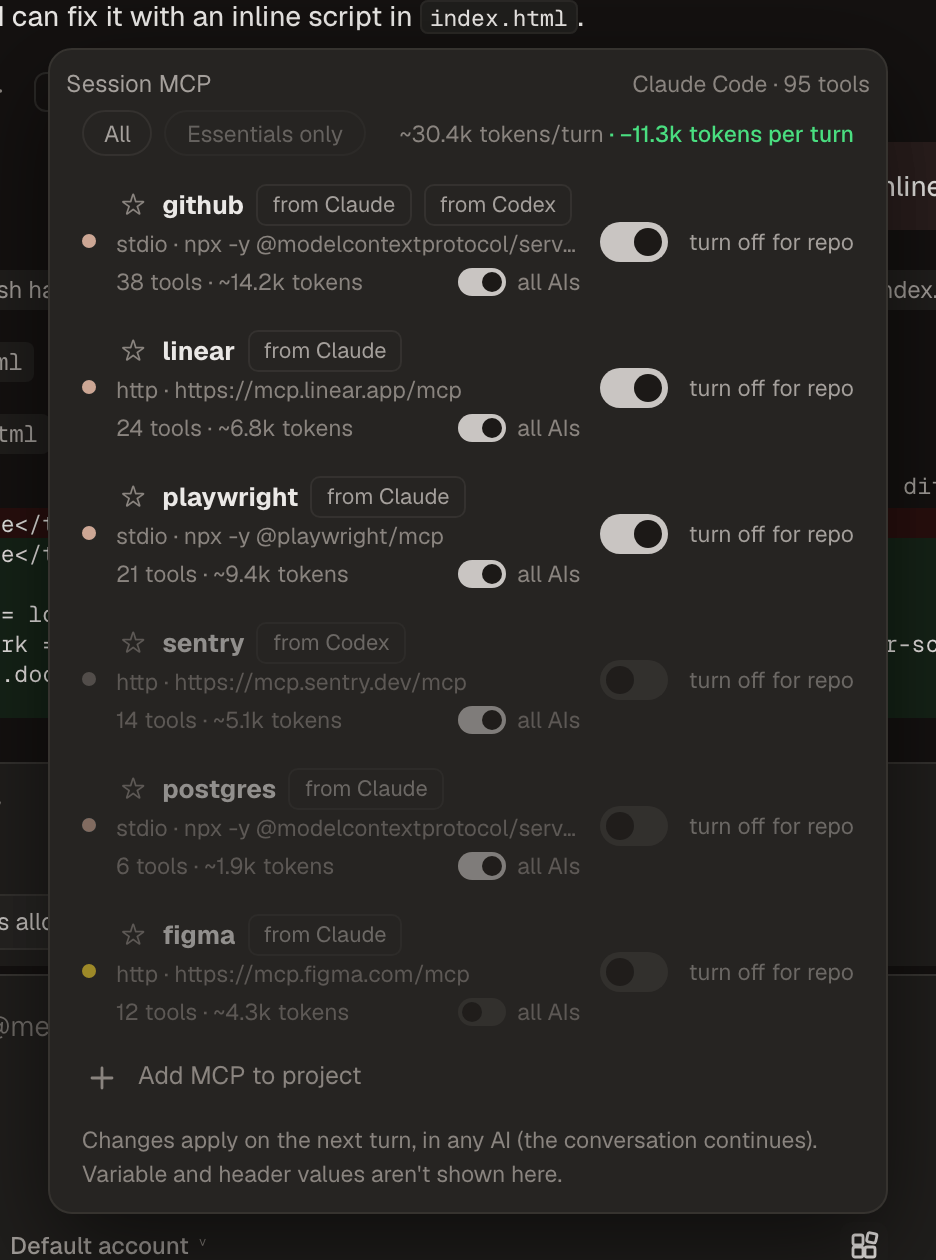
The MCP button in the composer lists the whole registry:
- Source ("from Claude", "from Codex"…) and conflict when the same name has different settings in different CLIs (the first wins, in the order Claude, Codex, OpenCode, Gemini CLI, Qwen Code, Antigravity).
- Context weight: tools and estimated tokens of their definitions (sent every turn). "Measure" starts the local server, asks for its tool list and caches the result.
- On/off for this session (remembered per tab) and off in this repo (repository default), effective on the next turn in any AI.
- Profiles: "All" and "Essentials only" (the ones starred in this repository), with the estimated savings ("−3.2k tokens per turn").
- All AIs: when off, the server stays in its source CLIs only.
- Add MCP to the project writes the project's
.mcp.json.
Gemini CLI and trusted folders
Gemini CLI turns every MCP server off in untrusted folders, including the ones sent over ACP. When Kabul injects servers into a Gemini CLI session it trusts the folder for that session only (GEMINI_CLI_TRUST_WORKSPACE=true, the variable behind --skip-trust) without writing trustedFolders.json. This also enables the project's own .gemini/settings.json servers.
Confirmed
A test MCP server (crates/kabul-core/tests/eco-mcp.mjs, tool eco) configured only in Claude (project .mcp.json) was called through Kabul by the real CLIs, with the test LLM: Gemini CLI 0.65 and Goose 1.55 (ACP mcpServers), Qwen Code 0.26.1 (behind its tool_search/tool_call), Codex 0.164 (-c mcp_servers.*; its approval arrives as mcpServer/elicitation/request and is now an approval card). OpenCode 2.1.4 connects the server from the injected config but does not list it in the "Code Mode" catalog the model sees (partial). Antigravity: export only.